
Learn
Kernel mode vs user mode drivers, explained
Why some drivers share the operating system's core and others run walled off, how requests cross between them, and why both kinds carry risks.
What this section covers
You may have read that “a bad driver can crash Windows” and also that “some drivers can’t.” Both are partly true, and the difference comes down to where a driver runs. This explainer covers the two privilege levels Windows uses, which drivers tend to run in each, how a request crosses between them, and what typically happens when each kind fails. The terms here are Windows terms. Other operating systems draw similar lines, but the details differ, so this guide is tagged for Windows only.
Two privilege levels
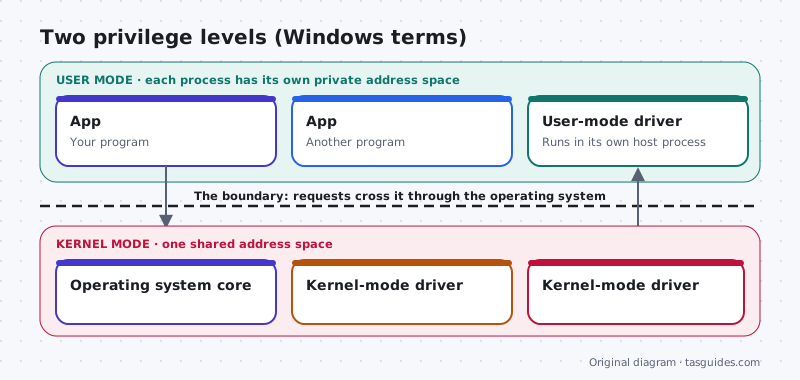
The processor in your computer can run code at different privilege levels, and Windows uses two of them. User mode is where your apps run. Kernel mode is where the core of the operating system runs.
Microsoft’s documentation explains the key difference. When Windows starts an app, it creates a process with its own private virtual address space. One app cannot simply change another app’s data, and if an app crashes, the damage is usually limited to that app. Code in kernel mode works differently: it all shares a single virtual address space. A kernel-mode driver is not isolated from other drivers or from the operating system itself, so a driver that writes to the wrong place can corrupt data that something else depends on.
Which drivers run where
Many hardware drivers on Windows run in kernel mode, especially those that need fast, direct access to hardware or that load very early, such as storage and graphics drivers. Windows also offers a framework for writing drivers that run in user mode, called the User-Mode Driver Framework (UMDF). Kernel-mode drivers are often built with its sibling, the Kernel-Mode Driver Framework (KMDF). Some device types commonly have user-mode drivers, for example certain sensors, portable devices and other USB gadgets, while the details vary from device to device.
A user-mode driver is not the whole story for its device. It runs in a host process, and its requests still reach the hardware through kernel-mode drivers further down the chain. User mode changes how isolated one piece of the work is, not whether the kernel is involved at all.
How a request crosses the boundary
When you save a file or play a sound, the request starts in user mode, inside your app. The app calls a function provided by Windows, and the processor switches into kernel mode so the operating system can handle it. The I/O manager routes the request to the right drivers. If one of those drivers runs in user mode, Windows passes the request out to that driver’s host process and takes the result back again before the request continues down to the hardware. The answer then returns to the app, crossing back into user mode.
Each crossing costs a little time. That small overhead is one reason performance-critical drivers often stay in kernel mode, and why designers weigh speed against isolation for each kind of device.
When a driver fails
Outcomes vary, but the typical patterns are clear enough to be useful.
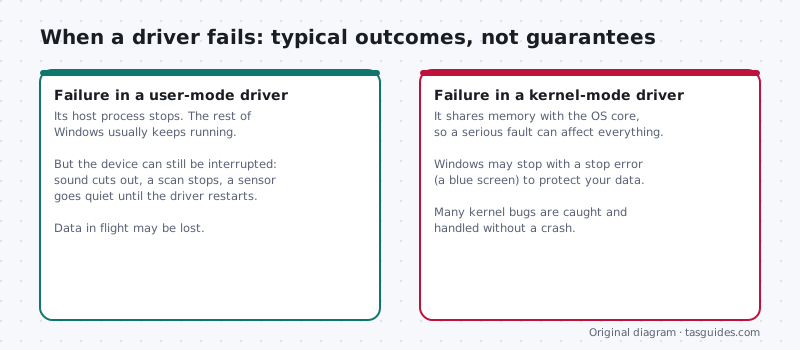
- A kernel-mode fault can stop everything. Because the driver shares space with the operating system, a serious error can leave Windows unable to continue safely. Windows then halts with a stop error, often called a blue screen, rather than risk corrupting your data. Many kernel bugs never get that far, but this is the worst case.
- A user-mode fault is usually contained, not harmless. The host process can stop and Windows can restart it while the rest of the system carries on. In the meantime the device can be interrupted: sound cuts out, a scan halts, a sensor goes quiet, and anything in progress may be lost.
- Neither mode is a guarantee. A user-mode driver depends on the kernel-mode drivers beneath it, and crashes have causes other than drivers, including failing hardware and overheating.
What this means for you
You do not need to know which mode a driver uses to look after your computer. A few habits cover it. If a stop error started right after a driver change, roll that driver back. If a device keeps dropping out while Windows stays up, check it in Device Manager and look for a newer driver from the maker. And get drivers only through Windows Update or the device maker, so whatever runs in that shared kernel space comes from a known source.
Keep exploring
New to the topic? Start with what a device driver is. Then see how driver stacks work to understand why one request can involve several drivers in both modes.
Where the boundary lives
Privilege levels are enforced by the processor
The separation between kernel mode and user mode is not just a software convention. Modern processors support different privilege levels, and the operating system uses them so that ordinary programs cannot directly access hardware or the memory of the kernel.
Code running in kernel mode, including kernel-mode drivers, operates at the higher privilege level. A bug there can affect the entire system. User-mode code runs at the lower level, and the processor stops it from reaching protected areas.
- That enforcement is why a crashing app usually takes down only itself.
- It is also why a faulty kernel-mode driver can cause a stop code.
Worked example
Example: two printers, two failure modes
Scenario, simplified for illustration: a crashing component in printing and a crashing graphics driver behave very differently.
- Modern Windows printer drivers largely run in user mode. If one fails, printing may stop or the print spooler may restart, but the rest of the system keeps running.
- Graphics drivers have kernel-mode parts. Windows can often recover by restarting the graphics driver, which you see as a brief black screen and a notice that the driver recovered.
- A failure in a kernel-mode component that Windows cannot recover from leads to a stop code and restart.
Exact behaviour depends on the driver and Windows version. The point is that where a driver runs shapes how a failure appears.
Split designs
Many drivers are split across both modes
Graphics drivers are a good example of a split design. A kernel-mode part handles memory management and scheduling for the graphics hardware, while user-mode parts translate graphics API calls from apps. This keeps as much code as practical out of the kernel.
Microsoft's driver frameworks support both kinds: the Kernel-Mode Driver Framework and the User-Mode Driver Framework. Microsoft's guidance encourages user mode where a device allows it, because failures there are easier to contain.
For you, the practical takeaway is simple: both kinds carry risks, and both should come from trusted sources, but a driver with kernel-mode components deserves extra care before you change it.
FAQ
Questions people actually ask
Are user-mode drivers safer than kernel-mode drivers?
They are more isolated, which usually limits the damage a bug can do. A failing user-mode driver typically ends only its own host process while Windows keeps running. That does not make them harmless: the device can stop working, work in progress can be lost, and the driver still depends on kernel-mode drivers further down.
Can a user-mode driver cause a blue screen?
Rarely directly, because it runs outside the shared kernel space. But its requests reach the hardware through kernel-mode drivers, and a problem anywhere in that chain can still lead to trouble. Treat any repeated crash after a driver change as a reason to roll that driver back.
How can I tell whether a driver runs in kernel mode?
There is no simple switch in Device Manager for owners, and you do not need one. As a rough guide, when a Windows stop error names a file ending in .sys, that file is typically a kernel-mode driver. The practical response is the same either way: roll back recent changes or get a fixed driver from the maker.
Why are so many drivers kernel-mode if it is riskier?
Some work needs direct, fast access to hardware and memory, or has to run before any user process exists, such as storage drivers that load the system itself. Microsoft encourages user-mode drivers where they fit, and many device types now use them.